7 Research-Based Teaching Principles – Oct.2019 Teaching Community of Practice (TCoP) Recap!

Hello Everyone!

My name is Dr. Rayna Friendly, and I am back again with a recap from SJSU’s October 2019 Teaching Community of Practice* (TCoP) Meeting. At this meeting, we once again had a guest facilitator: Dr. Mark Felton, Professor of Teacher Education and Faculty Associate Dean of Research in the Connie L. Lurie College of Education.

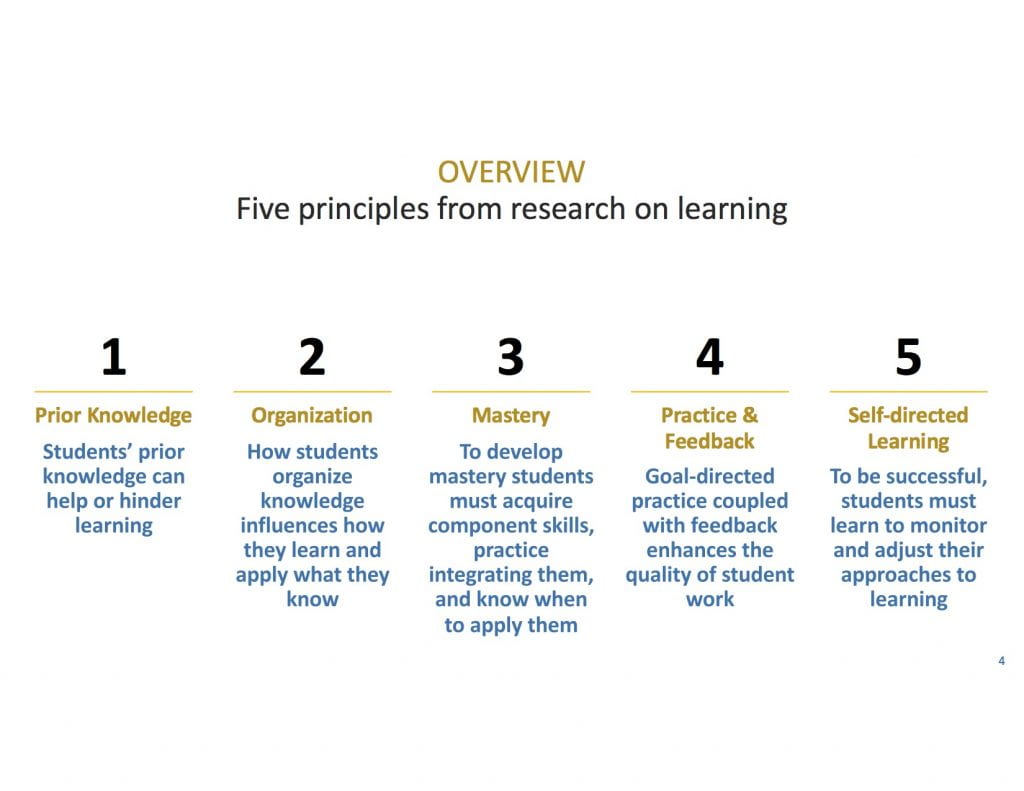
The topic of the meeting was 7 Research-Based Teaching Principles, based off the book How Learning Works (Ambrose, Bridges, DiPietro, Lovett, & Norman, 2010). By the way, a FREE electronic copy of this book can be accessed HERE! 

At this meeting, Mark reviewed 5 out of the 7 principles covered in the book (listed below), as well as some fantastic, practical ideas for how to apply these principles when teaching University students. If you missed the meeting, you can view the full Zoom Recording of this session HERE! I strongly recommend viewing the recording, as many common teaching challenges were addressed in respect to how to enhance the learning experiences students receive in the classroom (as well as tips for teachers to reduce time spent on grading student work!). Mark also welcomed any questions (his email is mark.felton@sjsu.edu). 


7 Research-Based Teaching Principles:

  1. Students’ prior knowledge can help or hinder learning
  2. How students organize knowledge influences how they learn and apply what they know
  3. To develop mastery students must acquire component skills, practice integrating them, and know when to apply them
  4. Goal-directed practice coupled with feedback enhances the quality of learning
  5. To be successful, students must learn to monitor and adjust their approaches to learning
  6. Student Development and course climate matter for student learning
  7. Helping students to become self-directed learners


*What is the TCoP, you ask?

  • The Teaching Community of Practice (TCoP) is a group for part- and full-time SJSU faculty (of all levels, across all departments), who are interested in enhancing their respective teaching practices. The TCoP will meet regularly, according to members’ schedules, to exchange strategies, tips and resources that have led to successful (and sometimes, less-than-successful) teaching experiences. Please fill out this form if you are interested in joining this community and you will be added to the groups’ mailing list. For inquires about the TCoP, please contact me at rayna.friendly@sjsu.edu.

Virtual Reality vs Virtual Worlds Smackdown!

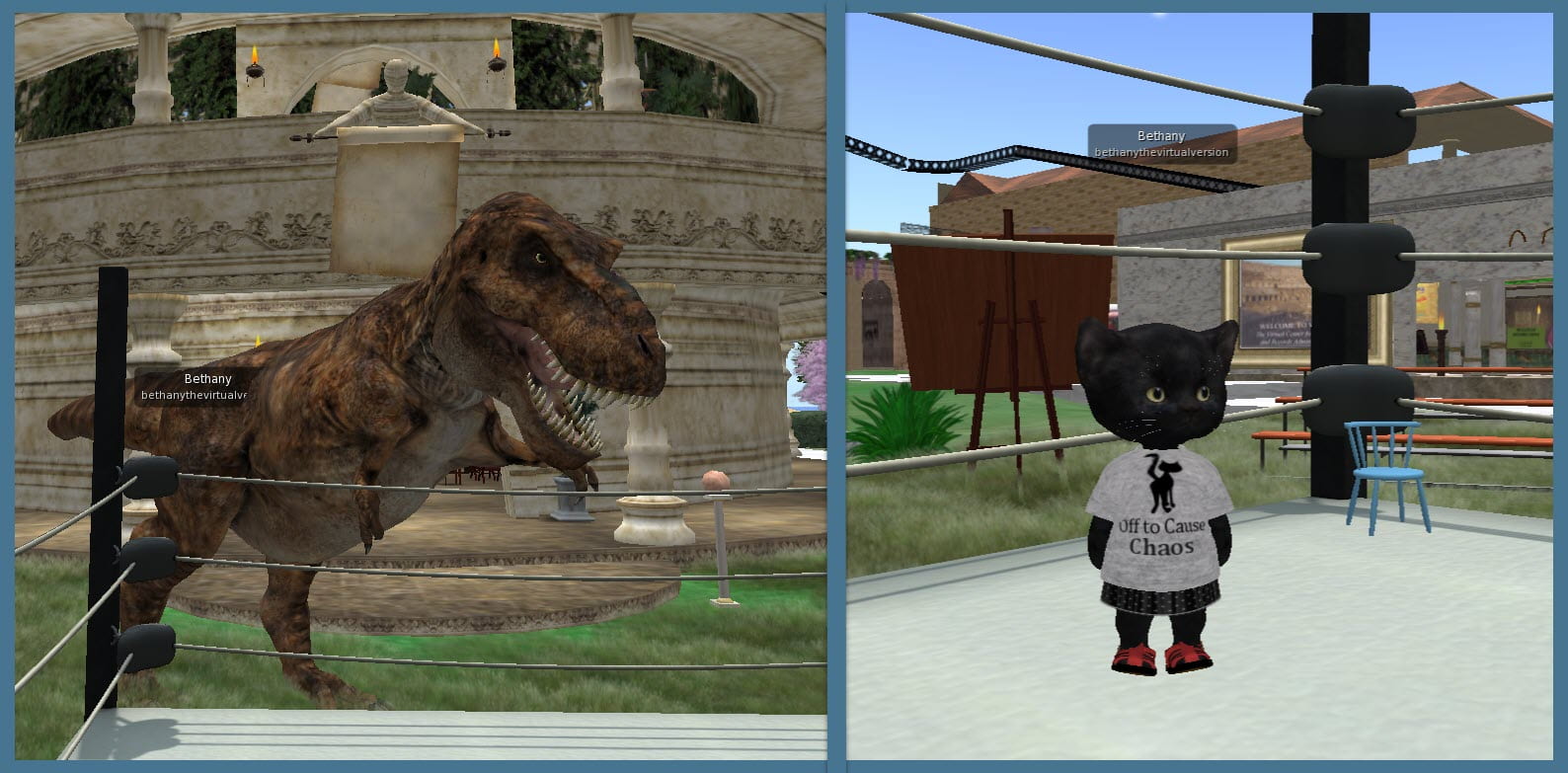
Bethany's Avatars: T-Rex & "Tiny"

Bethany’s Avatars: T-Rex & “Tiny”

I recently joined my Community Virtual Library and SJSU’s VCARA colleagues at a fun event held at iSchool Island in Second Life. We held a Virtual Reality vs Virtual Worlds Smackdown Debate, complete with our impressive avatars ready to duke it out for the audience!

Our sparring was moderated by Dr. Valerie Hill, the director of the Community Virtual Library in Second Life, Avacon, and Kitely. We each had five minutes to speak, and then five minutes to refute our opponent’s position on the most important criteria for immersive environments (as recently identified in an unpublished VCARA survey). The criteria include:

  • Persistence
  • Accessibility
  • Open Educational Resources (OER)
  • Community of Practice
  • Building Independently and Collaboratively

Alyse Dunavant-Jones, the co-director of CVL, argued that  “VR is the future, and the future is now!” while embodied as an enormous fire-breathing dragon. I was embodied as a fearsome Tyrannosaurus Rex, arguing that virtual worlds have a much longer and proven history, and still offer a tremendous opportunity for immersive learning. Our avatars were actually so big, we traded into smaller sized ones while standing in the boxing ring to speak. As Alyse spoke she was embodied as a human-sized Gecko in the boxing ring. My T-Rex avatar loomed ominously outside the ring, growling of course. When it was my turn to speak I changed into my “tiny”, a cute black kitten with a fierce attitude. I was fearless of Alyce-as-dragon flying overhead! 

The event concluded as a draw, with both sides conceding that there are benefits and drawbacks to each. Also, it’s critical that pedagogy remain central. It is not enough to merely learn how to use the technology. The main takeaway I wanted to leave with the audience with is that regardless of what platforms we may use in the future, designers of any immersive learning activities have to be familiar with the long history of virtual worlds in education. More importantly, they should already have hands-on experience in virtual worlds. 

Check out more pictures at the VCARA blog post about the event. Anyone interested in networking (and having fun!) with educators in virtual worlds should contact Bethany at eCampus to learn more!

ACADEMIC TECHNOLOGY EXPO – 2019

The 2019 ATXpo- Academic Technology Expo held at Santa Clara University on October 7, 2019 was the sixth annual ATXpo that brought together the insightful and bright minds from eight Bay Area esteemed universities that included- University of San Francisco, UC Berkeley, UC San Francisco, Stanford University, San Francisco State University, San Jose State University, Santa Clara University and Saint Mary’s College of California. These universities aimed to provide an exposure to the recently acquired technologies that are going to promote learning and improve the conventional methods of teaching.

This was a full day event where participants interacted with each other. The agenda included a Keynote Session, highlights on featured projects, and three sessions of IdeaLabs. These sessions were engaging and were experimented on through play .These sessions exhibited the projects and technologies that are surfacing to, promote an interactive and better learning environment. It demonstrated the new generation teaching methodologies that can be acquired by universities for more equipped classrooms and knowledge transfer experiences.

Attendees from San Jose State University left an remarkable impression and their efforts worth their weight in gold. So it’s worth taking the time to find just the right words to describe their work below.

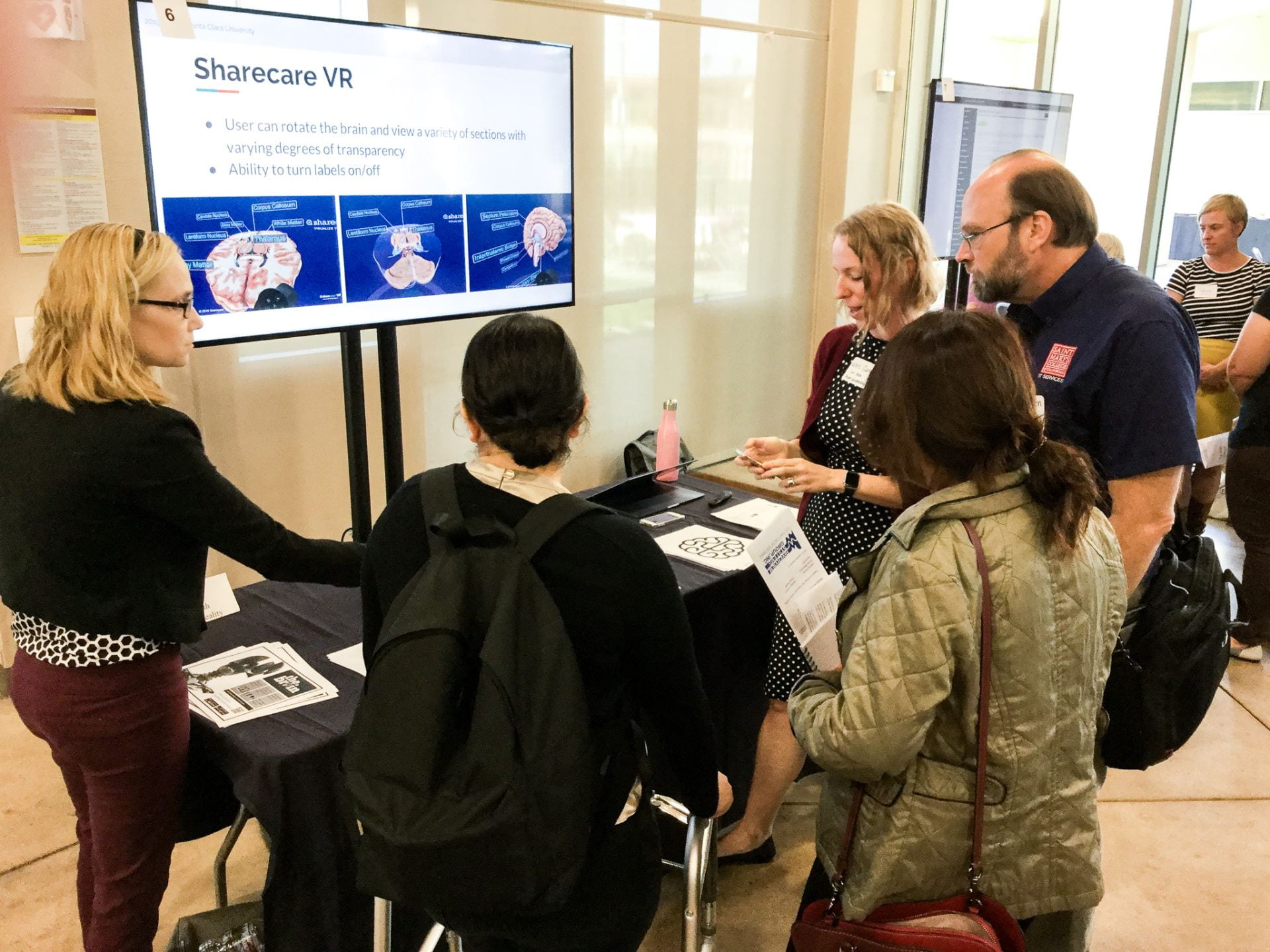
Jennifer Redd (Director of eCampus- San Jose State University) talked in her introductory presentation about how important is it to communicate she said, “the development of a communication plan that encourages creativity is a great supplement to providing technical and instructional support.” She mentioned how eCampus proudly produces artwork catered to the campus community. The artwork creates a safe, welcoming, and inclusive atmosphere. Every month eCampus showcase one person, who has impacted the world in a positive way and illustrate them on our, ‘Person of the Month’ wall. She clearly made us all understand that, you have to find a way to communicate to cultivate the learning and knowledge.

During the second IdeaLab Session, Jennifer joined Assistant Professor of Psychology Valerie Carr as she shared how she designed a neuroanatomy lab by using augmented and virtual reality. Dr. Carr, a previous eCampus Immersive Learning Institute Participant who worked closely with eCampus Lead Instructional Designer Yingjie Liu, described how she selected and implemented the use of different AR/VR apps into the curriculum to provide students with an immersive experience on a complex topic (the brain).
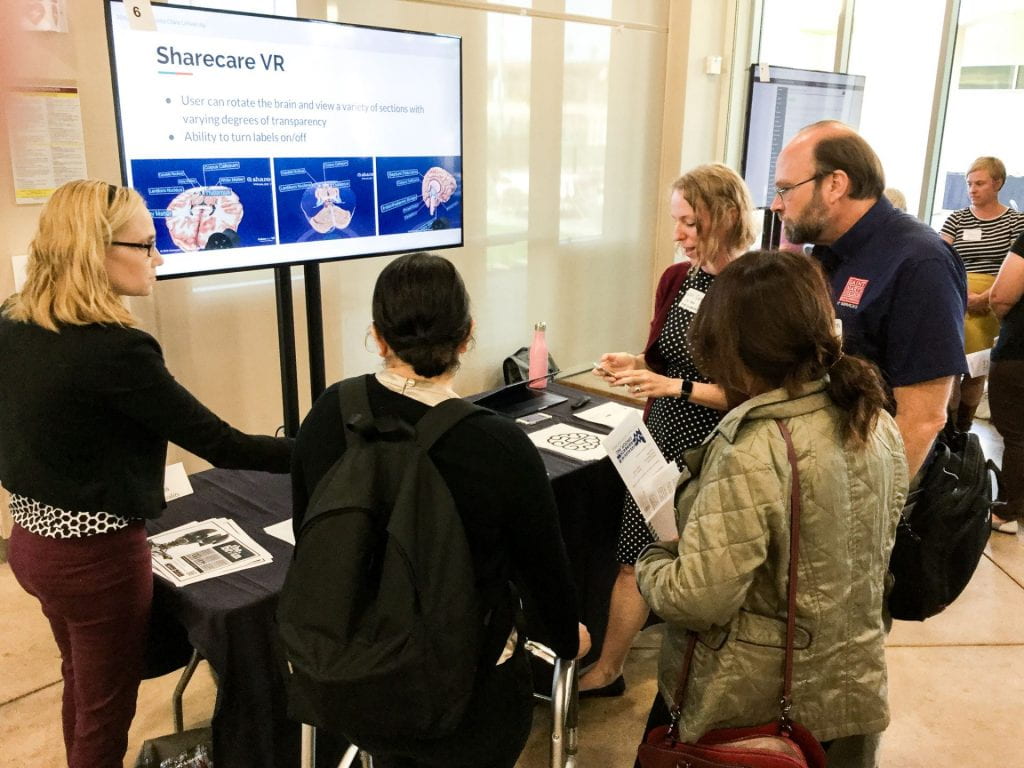
ATXpo - Jennifer

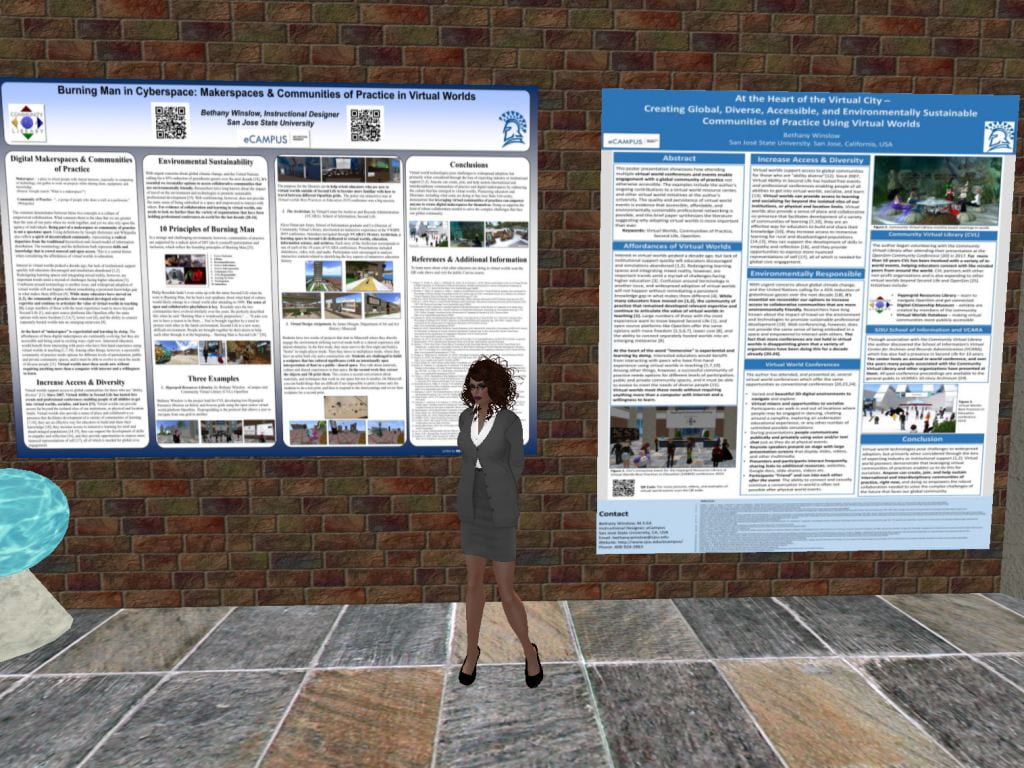
Bethany Winslow (Instructional Designer at eCampus- San Jose State University) talked and demonstrated about this intriguing topic, “Tinkering in Virtual Worlds: Experiential Preparation & Networking for VR Ready Educators” She presented a demonstration of the Hypergrid Resources Library she built, that connects different virtual worlds in the OpenSim metaverse. Bethany volunteers with The Community Virtual Library, which has had a presence in virtual worlds for over a decade now. Open-source virtual worlds like the one she showcased are hosted on a distributed system of servers all over the world. She offered participants with an opportunity to try navigating an avatar on the laptop to explore the library and to Hypergrid jump to another location. Bethany shared her experiences in the last year and a half of networking and collaborating 100% in the virtual world with a global community of educators and librarians, of attending multiple virtual events, and about presenting in-world at virtual educational conferences. She urges any educators interested in integrating virtual reality with their teaching to make sure they are familiar with the long history of desktop virtual reality used for teaching and learning.

Bethany In-WorldPresenting

Bethany’s avatar in virtual world library with some of the posters she presented

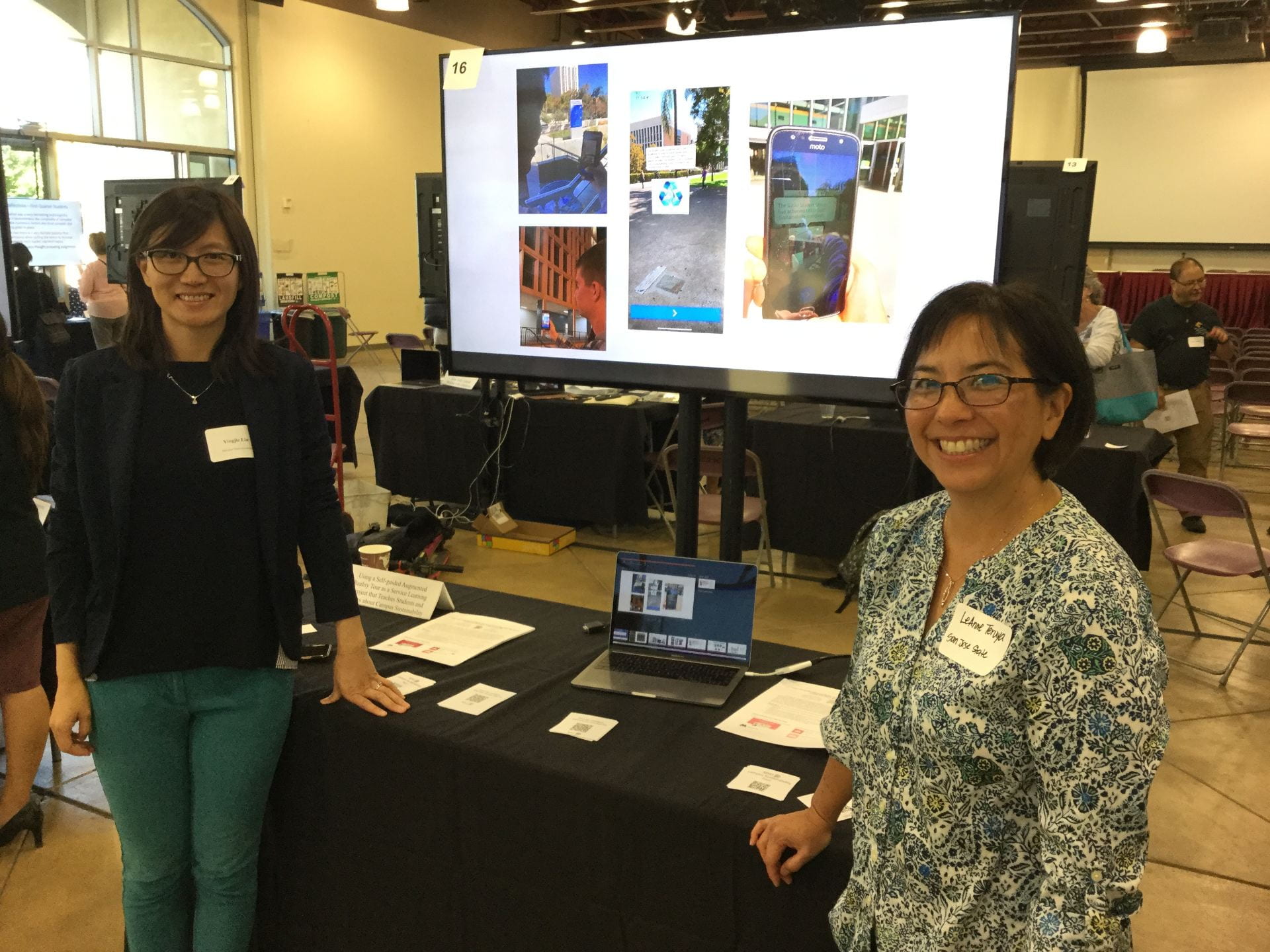
Yingjie Liu (Instructional Designer at eCampus- San Jose State University) gave an impressive tour, where participants immersed in the world of augmented reality. Her topic was, “Using a Self-guided Augmented Reality Tour as a Service Learning Project that Teaches Students and Others about Campus Sustainability”

She highlighted the initiatives going on in our University and mentioned students in a Geology of California course at San Jose State University (SJSU) during the Spring’19 session, created an augmented reality sustainability tour of the campus as part of a service-learning Earth Day 2019 project. This project was designed to:

1) Teach students concrete ways to live sustainability

2) Draw attention to the sustainability practices on campus and

3) Contribute to the school’s sustainability mission.

These goals were accomplished by having students research sustainable practices, locate examples on campus, then create augmented reality (AR) tour stops that highlight and explain the sustainability examples. The students contributed to SJSU’s sustainability mission by providing an AR tour that teaches others about sustainability and encourages participation in the school’s efforts to be more environmentally friendly and sustainable.

She demonstrated how this project, revamped San Jose State University’s outdated online Sustainability Map and elevated the user experience by making it mobile (accessed via smartphone or tablet), and immediate (instant on-the-spot information). She concluded that by saying, “Overall, students had a positive experience creating, using, and learning from augmented reality. Students’ reflections revealed that prior to doing the project, they had little knowledge of SJSU’s sustainability practices. After having completed the project, students displayed a sense of pride for all that the school does to be environmentally sustainable. They also felt that they gained knowledge about what sustainability is, and learned something new about sustainability at SJSU.”
She encouraged people on how this example set by San Jose State University should be a motivation for thousands of such initiatives and guided on how these initiatives can take a kick start.
ATXpo- Yingjie
References
2. Winslow, Bethany. (2019, Oct 10). Interview type [email].
3. Liu, Yingjie. (2019, Oct 10). Interview type [email].
4. Redd Jennifer. (2019, Oct 10). Interview type [email].

Lesson Design Using the ‘BOPPPS’ Model – Part 2: Intended Learning Outcomes

Hello SJSU Community!

It’s Dr. Rayna Friendly again. In a previous post, I introduced a model of lesson design that I learned during my graduate degree, that is taught in the Instructional Skills Workshop (ISW), which has been run in more than 100 academic institutions worldwide (Day, 2004)! To date, the ISW has been found to be an effective way to transform instructor’s teaching in the classroom such that ISW participants were found to reduce their teacher-focused thinking in comparison to controls, as well as increase the number of active learning strategies used in their classrooms (e.g., Dawson et al., 2014; Macpherson, 2011). ‘BOPPPS’ is actually an acronym, which stands for the 6 basic components that are important to consider including when you are designing a lesson or workshop:

  • Bridge into the lesson
  • Outcomes for the lesson (as in Intended Learning Outcomes)
  • Pre-assessment of learners’ existing knowledge of those outcomes
  • Participatory Activities (as in Active Learning Strategies)
  • Post-assessment of learners’ knowledge of the outcomes
  • Summary of the lesson content

In a previous blog post, I discussed the first component: the Bridge. Today, I would like to delve deeper into the second component: Intended Learning OUTCOMES for the lesson.

Intended Learning Outcomes (ILOs) outline what you hope the learning to learn at the end of your lesson, module, or program. There are many online resources for you to check out that explain how to write and utilize ILOs in your teaching. Here is a good one from the University of Waterloo in Ontario, Canada, but feel free to Google for other versions that work best for you. The ILOs are important to include so that learners know what you expect from them, and these also should should determine the types of activities and assessments you include in your lessons (more on this in my upcoming blog posts on pre/post assessments and participatory activities!). Let me show you an example of some ILOs for one of the lessons I teach, before explaining the components:

By the end of this class, students will be able to:

•Differentiate two types of metacognition
•Describe developmental trends in explicit and implicit metacognition
Reflect on how you use metacognition for schoolwork
Practice Active Listening, Meditation & “Mindfulness” to enhance your metacognitive abilities

In the example above, you should be able to note 3 important components of writing ILOS:

    1. First, specify the timeframe. When will the student be able to achieve the outcomes? By the end of the lesson, by the end of the module, by the end of the course, etc? I state the ILOs for each of my lectures, at the beginning of class, before we start discussing any course content. I also use these ILOs for my student’s study guides, making a checklist stating what they should be able to know/do by the end of each lecture!
    2. The knowledge/skills learners should be able to gain. In the above example, you can see how the learner is explicitly told what knowledge/skills are important to the instructor. Essentially, it should describe the types of learning that will be assessed later in formal and informal ways. In the example, for instance, this includes “two types of metacognition”, “developmental trends in explicit and implicit metacognition”, and so on.
    3. What the learners should be able to do with that knowledge (i.e., action verbs!). Here is, in my opinion, the most important and useful component of ILOs: the verbs. What should the learners be able to do with the knowledge they’re learning? In the above example, you can see these verbs, such as “differentiate”, “describe”, “reflect”, and “practice”. These verbs relate back to Boom’s Taxonomy (1956), revised in (2001) of types of actions we can do with knowledge. They range from the least effort needed (e.g., simply remembering information) and advance with subsequent complexity up to being able to evaluate or create something new. There are MANY versions of this taxonomy online, I recommend doing a Google Image search for a diagram of the taxonomy that works best for you!  These verbs should then align with the teaching and testing methods you used (e.g., if you say that learners should be able to create something, how can you evaluate this creation?)

Look out for my following blog posts to learn more about the rest of the components of the BOPPPS Model. Next I will go into the pre/post assessments and how to align them with your ILOs!


(Note that these BOPPPS posts might be interspersed with content updates from the Teaching Community of Practice (TCoP), which I facilitate.) What is the TCoP, you ask?

  • The Teaching Community of Practice (TCoP) is a group for part- and full-time SJSU faculty (of all levels, across all departments), who are interested in enhancing their respective teaching practices. The TCoP will meet regularly, according to members’ schedules, to exchange strategies, tips and resources that have led to successful (and sometimes, less-than-successful) teaching experiences. Please fill out this form if you are interested in joining this community and you will be added to the groups’ mailing list. For inquires about the TCoP, please contact me at rayna.friendly@sjsu.edu.


REFERENCES:

Day, R., & the ISW International Advisory Committee. (2004). Instructional Skills Workshop: From grassroots initiative to international perspectives. Paper presented at the Society for Teaching and Learning in Higher Education. Retrieved from http://iswnetwork.ca/wp-content/uploads/2012/07/Hand5_ICED.pdf

Dawson, D., Borin, P., Meadows, K., Britnell, J., Olsen, K. & McIntryre, G. (2014). The Impact of the Instructional Skills Workshop on Faculty Approaches to Teaching. Toronto ON: Higher Education Quality Council of Ontario

Macpherson, A. (2011). The Instructional Skills Workshop as a transformative learning process. Unpublished doctoral dissertation. Simon Fraser University, Burnaby, BC.

Using Piazza for Class Discussions – Sep.2019 Teaching Community of Practice (TCoP) Recap!

Hi Everyone!

SJSU’s September 2019 Teaching Community of Practice* (TCoP) Meeting was on the topic of Using Piazza for Class Engagement and Discussions. We had a special guest facilitator, Krissy Connell (Lecturer in the Child and Adolescent Development Department), who shared the various ways she used Piazza in her courses.

  • NOTE: For those who were unable to attend, the Zoom RECORDING of this meeting can be found HERE.


TAKE-AWAY POINTS ABOUT PIAZZA. The following are some of the key take-aways about the usefulness of the Piazza tool, highlighting how and why you might consider using it yourself in any courses you teach:

  • Krissy mostly uses Piazza as a discussion tool, since she has found increased student participation in discussions using Piazza, as compared to using the Canvas’ “Discussion” feature. She also points out that students can use this tool while studying, since they can benefit from seeing her responses to all the questions other students ask!
  • Some of Krissy’s favorite features of this tool include:
    • Ability to organize the discussion posts by FOLDERS (e.g., can organize according to course and by each lecture/module/topic you teach. Plus you cannot accidentally forget to label your posts by folder, since you are required to publish them to one of your folders upon posting)
    • Students can post questions, as well as responses to other students’ questions, ANONYMOUSLY (Krissy says this is the Student’s most reported favorite feature and has led to more students participating in discussions)
    • With one click of a button, the instructor can label students’ questions/responses as a “GOOD QUESTION” or “GOOD RESPONSE”, respectively. Krissy said that she does this for all posts because it makes students feel good to get this feedback
    • Instructor can also post to an individual section or to multiple SECTIONS of the same course at once
    • Students can create STUDY GROUPS and you can see, and comment on, their discussions, 
    • Instructors can create a POLL within a ‘discussion post’, ‘question’, or ‘note’ to her students
    • Instructors can send REMINDERS to students to comment on a post or discussion
    • Piazza’s “CLASS AT A GLANCE” tool shows instructors a dashboard summarizing recent Piazza activity by students, such as: # unread posts, # of follow-ups, average response time, etc.
    • The STATISTICS tab shows you trends in responses (good if there’s a requirement in your syllabus for course discussion)- this also shows trends by the folders you create!
    • You can set up Piazza to EMAIL you every time there’s a post, etc.
    • PEER EDUCATORS or TEACHING ASSISTANTS for the course can also answer questions from students, and instructor can review these to ensure they are good answers
    • EXIT POLL are a very useful feature that you can add to posts, where students are given the opportunity to indicate what they were confused about, how comfortable they are with what they are learning, and any additional questions they may have. 

Questions & Comments:

  • Q: Will this add too much complexity for students, teachers?
    • This is really easy for students to set up, because Piazza’s integrated with canvas!
    • They will just have to quickly register/login at the beginning of term, and can do so right from the Canvas course!
    • Super efficient and easy to post a question, poll, etc.! The text box has the usual text editor ( you can add links, change the font, etc)
    • Krissy’s biggest set up task is to create the folders (for each module, quiz, exam, etc.) at the beginning of term (however, this too is not difficult as you can “batch-add” folders, rather than needed to add one folder at a time)
  • Q: Is Piazza ‘worth the trouble’ to implement this my classroom?
    • Krissy thinks so! She emphasized that most students say they prefer this tool to Canvas’ Discussion feature, especially because they can post anonymously
    • Krissy thinks Piazza has so many more resources/tools for her than Canvas…she even removed the ‘Discussion’ tab from Canvas’ course navigation bar so that all discussions go through Piazza
    • Folders help you organize your discussions! Important because this way students don’t need to scroll through all their announcements to find old content, etc.
  • Q: Do you have to create a new set of folders for every term you teach?
    • Yes, but this is relatively easy. Simply go to “manage class > configure class folders” and then you can bulk-add folders!
  • Q: If you copy your course Canvas shell, does it copy the Piazza layout?
    • No, you would still need to make new Piazza folders, but this is not too much work
  • Q: Can you use Piazza in-class and online? Maybe integrate with quizzes online?
    • Krissy hasn’t tried looking for any quiz features, but there are a lot of features you can add-on to Piazza, ask eCampus!
  • Q: When students enroll and are added to Canvas late, are they added to Piazza automatically?
    • As soon as they are added to Canvas, they can enroll/register with Piazza
  • Q: What are some of the common challenges that your students experience when using it?

    • Students need to make sure they click on the correct folder to see relevant posts
    • Students who are uncomfortable with technology/ not using Canvas often might not use the tool much. However, students she’s asked have mostly said they liked Piazza, especially the anonymous feature!
  • Q: Do students get notifications when you post on Piazza through their email like they do with Canvas announcements?

    • Yes! Krissy can choose when the notification goes out (can save as a draft to send later) and who it will go to (to whole sections, individual students), and can even force-send an email to students who did not sign-up for email reminders.
  • Q: Can SJSU people contact you for more information?

    • Yes! Krissy said you are welcome to email her (krissy.connell@sjsu.edu) for more information
    • You can also contact eCampus for more information


*What is the TCoP, you ask?

  • The Teaching Community of Practice (TCoP) is a group for part- and full-time SJSU faculty (of all levels, across all departments), who are interested in enhancing their respective teaching practices. The TCoP will meet regularly, according to members’ schedules, to exchange strategies, tips and resources that have led to successful (and sometimes, less-than-successful) teaching experiences. Please fill out this form if you are interested in joining this community and you will be added to the groups’ mailing list. For inquires about the TCoP, please contact me at rayna.friendly@sjsu.edu.